Download Video from URL – Save Videos Instantly from Any Public Link





.webp)



.webp)





.webp)
Easily Download Videos with Our Online Tool
Quickly and effortlessly download videos from any URL using our Download Video from URL Online tool. Whether you want to save videos for offline viewing, educational purposes, or personal projects, our tool provides a simple and efficient way to download videos from various websites.
Why Choose A2Z.Tools?
- Simplicity and Ease of Use:
With A2Z.Tools, downloading videos from URLs is as easy as 1-2-3. Our intuitive interface allows you to quickly paste the video URL, select your preferred format and quality, and initiate the download process – all within seconds. - Wide Compatibility:
Whether you're using a desktop computer, laptop, tablet, or smartphone, A2Z.Tools are compatible with all major web browsers and operating systems. You can access our tool anytime, anywhere, without any limitations. - High-Quality Downloads:
Say goodbye to grainy, low-resolution videos. A2Z.Tools ensure that you get the best possible quality downloads, whether you're saving videos for offline viewing or archiving them for future reference. Enjoy crystal-clear visuals and crisp audio every time. - Versatile Format Options:
We understand that different users have different preferences when it comes to video formats. That's why A2Z.Tools offer a wide range of format options, including MP4, AVI, WMV, MOV, and more. Choose the format that works best for you and your devices. - Lightning-Fast Speeds:
Time is precious, and we value yours. A2Z.Tools leverages cutting-edge technology to deliver lightning-fast download speeds, so you can get your videos quickly and get on with your day. No more waiting around for downloads to complete – it's fast and efficient. - Safe and Secure:
Your privacy and security are our top priorities. A2Z.Tools employ robust encryption protocols to ensure that your personal information remains protected at all times. Download assured in the knowledge that we prioritize your data's safety and security - Free of Cost:
Best of all, A2Z.Tools are completely free to use. No hidden fees, and no subscriptions – just pure, uninterrupted access to our powerful online video-downloading tool. Experience the freedom of downloading videos without breaking the bank.
How To Use a2z.tools Download Video From URL Tool (Step-by-Step Guide)
Downloading your favorite videos has never been easier! Just follow the simple steps below to download videos using the a2z.tools "Download Video from URL" tool:
Step 1: Copy the Video URL
Go to the platform (e.g., YouTube, Facebook, Instagram, or any other) and copy the full URL of the video you want to download.
Example: https://www.youtube.com/watch?v=xyz123
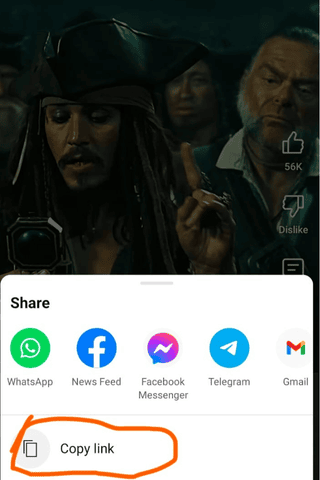
Step 2: Open a2z.tools Download Video Tool
Navigate to the tool page on a2z.tools
Look for the tool titled "Download Video from URL" and click to open it.
Step 3: Paste the Video URL
In the input box, paste the copied video URL.
Make sure it’s a valid video link from supported platforms.
.jpg)
Step 4: Click on "Download" or "Fetch Video"
Hit the Download button and wait a few seconds while the tool fetches the video.
It will process the video and show available download formats (like MP4, 360p, 720p, etc.).
.jpg)
Step 5: Choose Format and Download
Click on the format you want to download (e.g., 720p MP4) and your download will start instantly.
.jpg)
Supported Platforms
- YouTube*
- Facebook*
- Twitter (X)
- TikTok
- Vimeo
- Direct .mp4 URLs
*Some platforms may restrict certain downloads due to policy limitations.
Downloading your favorite videos has never been easier! Just follow the simple steps below to download videos using the a2z.tools "Download Video from URL" tool
Conclusion:
With A2Z.Tools, unlocking the power of online video downloading have never been easier. Whether you're a student, educator, professional, or simply a video enthusiast, our tool empowers you to access and enjoy your favorite online videos on your terms.
⚠️ Important Notice on Usage
We respect all copyright laws and intellectual property rights. This tool is intended only for downloading publicly accessible videos. Do not use this tool to download copyrighted, private, or restricted content without the necessary permissions.
- ✅ You have the right to access and download the video.
- ✅ The video is publicly available (not behind a login, subscription, or paywall).
- ❌ You will not use this tool for any purpose that violates copyright or the terms of the video host platform.
Quick answer
Paste a Generic URL video URL and click fetch; the tool lists downloadable formats for videos from many publicly supported websites so you can save the one you want.
Key facts
- Works with videos from many publicly supported websites|The URL is sent to A2Z Tools' own download-processing service, which retrieves the available formats|works with a wide range of publicly supported sites rather than one specific platform|The file streams to your browser as a direct download, not saved permanently on our web server|Free to use, no signup required
What is this tool?
This tool lets you download a copy of videos from many publicly supported websites by pasting its URL, choosing from the available download formats, and saving it to your device.How to use it
Paste the Generic URL video's URL into the input box and click the fetch button. The tool retrieves the formats available for that specific video; pick the one you want and download it.- Copy the URL of the Generic URL video you want to download.|Paste the URL into the input field on this page.|Click the fetch button to retrieve the available download formats.|Choose a format/quality option from the list.|Download the video file to your device.
Example
Example: pasting a Generic URL video URL and clicking fetch shows a list of downloadable format cards with their quality, ready to save.How it works
When you click fetch, the page calls A2Z Tools' own server endpoint with your URL. That endpoint forwards the request to A2Z Tools' dedicated download-processing service, which extracts the video's available formats and returns them; the page then displays them as selectable format cards. Choosing a format streams the file back to your browser through a proxy endpoint.Common use cases
Saving a Generic URL video for offline viewing.|Archiving your own uploaded Generic URL content.|Downloading royalty-free or Creative-Commons-licensed videos for personal use.|Extracting video content from Generic URL for reference or study.Benefits
Free, no signup, and works directly from a pasted URL without needing separate downloader software.Limitations
works with a wide range of publicly supported sites rather than one specific platform; available formats and quality depend entirely on what the source video offers, not on this tool; downloading copyrighted video without permission from the rights holder may violate Generic URL's terms of service or copyright law, and users are responsible for how they use downloaded content.Privacy & your data
The URL you submit is sent from our server to A2Z Tools' own download-processing service to retrieve the video's available formats; the resulting file is then streamed to your browser as a download. We do not have visibility into whether the separate download-processing service retains any data, so that specific behaviour is not independently verified from this codebase.Frequently asked questions
Can I download any video from Generic URL with this tool?
What video quality/format will I get?
Is it legal to download videos from Generic URL?
Is this tool free to use?
Related tools
Last reviewed: