Facebook Video Downloader – Save Facebook Videos ,Status and Live



.webp)

.webp)

.webp)
.webp)








Facebook is the world's number 1 social media platform, where millions of videos are shared every day. But Facebook does not give the option to download the video by itself, which sometimes makes it difficult for us to save our favorite video. Our A2Z.Tools Facebook Video Downloader is for you to meet this need! Through this, you can save any Facebook video in your gallery in a few seconds, that too without installing any app or software.
What is a Facebook Video Downloader?
As I said earlier, Facebook does not offer any option to download the video by itself. In such a situation, we need an external tool, which is called Facebook Video Downloader. With the help of this tool, you can download your favorite Facebook video quickly, that too in different quality such as SD, HD, and Full HD. Whether there is a fun clip, informative video, or memorable moment, now you can easily save them on your mobile or computer!
How to Download Facebook Videos Online?
Now when you came to know that we have to use a tool to download Facebook video, the next question comes—how to do it? Let us tell you a step-by-step guide so that you can easily download your favorite Facebook video!
-
Step 1: Copy video link
-
First of all, open the video you want to download.
-
Three dots (⋮) will appear above the video; click on them.
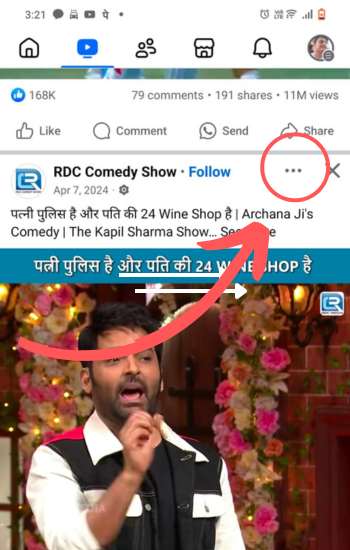
-
Now you will see a menu, from which the option of "Copy Link" (Copy Link) will be available.
.jpg)
-
Click on it and copy the URL of the video.
2. Step: Paste the link and download the video.
-
Now go to A2Z.Tools Facebook Video Downloader.
-
There you will get the option of "paste URL" (paste link).
-
Paste the copied video link in the search box.
-
Now click on the "Download" (Download) button.
-
The tool will process the video in a few seconds and then give you the option to download HD, SD, or Full HD quality.
-
Choose your desired quality and press the download button—it's up!
Now your favorite Facebook video will be saved in your gallery or computer, and you can watch it offline whenever you want!
Why Use Our Facebook Video Downloader?
Although you will find many Facebook video downloader tools on the Internet, there are many special reasons behind choosing A2Z.Tools Facebook Video Downloader. Let's know why our tool is the best option for you.
-
100% free and super fast—our tool is absolutely free! You can download Facebook videos in a few seconds without spending any money. With the help of a fast server, the video processes quickly, which saves you time.
-
Use directly without registration—there are many downloaders where it is necessary to create and log in to the first account. But nothing like this on A2Z.Tools!
-
No signup, no login—just paste the link and download!
-
HD and SD Quality Support—We give you various quality options to download the video—SD, HD, and Full HD (MP4 format).
Now you can save videos in high quality as per your need!
-
Mobile and desktop friendly—Our tool is perfectly responsive and works in the best way on mobile, tablet, and desktop. Now, whether you are on the phone or on the laptop, just download the video in one click!
-
Download videos without a watermark—Many tools put a watermark on the downloaded video, which causes the original quality of the video to deteriorate. But the Facebook video downloaded from our tool will be completely clean and without any watermark!
Frequently Asked Questions (FAQs)
1. Is the Facebook Video Downloader free to use?
Yes! Our tool is 100% free with no hidden charges or sign-ups required.
2. Can I download private Facebook videos?
Our tool primarily supports public Facebook videos. If you need to download a private video, you may need additional permissions or special methods.
3. What video formats are supported?
You can download Facebook videos in MP4 format with different quality options like SD, HD, and Full HD.
4. Can I use this tool on my phone?
Yes! Our Facebook Video Downloader is fully optimized for mobile phones, tablets, and desktops.
⚠️ Important Notice on Usage
We respect Facebook's Terms of Service and all applicable copyright laws. This tool is intended only for downloading publicly available Facebook videos. Do not use this tool to download private videos or copyrighted content without proper authorization.
- ✅ You have the legal right to view and download the video.
- ✅ The video is publicly accessible (not from private groups, private profiles, or restricted pages).
- ❌ You will not use this tool to download videos in violation of Facebook's terms or copyright regulations.
Quick answer
Paste a Facebook video URL and click fetch; the tool lists downloadable formats for public Facebook videos, Stories, and Live recordings so you can save the one you want.
Key facts
- Works with public Facebook videos, Stories, and Live recordings|The URL is sent to A2Z Tools' own download-processing service, which retrieves the available formats|only works with videos set to public visibility on Facebook|The file streams to your browser as a direct download, not saved permanently on our web server|Free to use, no signup required
What is this tool?
This tool lets you download a copy of public Facebook videos, Stories, and Live recordings by pasting its URL, choosing from the available download formats, and saving it to your device.How to use it
Paste the Facebook video's URL into the input box and click the fetch button. The tool retrieves the formats available for that specific video; pick the one you want and download it.- Copy the URL of the Facebook video you want to download.|Paste the URL into the input field on this page.|Click the fetch button to retrieve the available download formats.|Choose a format/quality option from the list.|Download the video file to your device.
Example
Example: pasting a Facebook video URL and clicking fetch shows a list of downloadable format cards with their quality, ready to save.How it works
When you click fetch, the page calls A2Z Tools' own server endpoint with your URL. That endpoint forwards the request to A2Z Tools' dedicated download-processing service, which extracts the video's available formats and returns them; the page then displays them as selectable format cards. Choosing a format streams the file back to your browser through a proxy endpoint.Common use cases
Saving a Facebook video for offline viewing.|Archiving your own uploaded Facebook content.|Downloading royalty-free or Creative-Commons-licensed videos for personal use.|Extracting video content from Facebook for reference or study.Benefits
Free, no signup, and works directly from a pasted URL without needing separate downloader software.Limitations
only works with videos set to public visibility on Facebook; available formats and quality depend entirely on what the source video offers, not on this tool; downloading copyrighted video without permission from the rights holder may violate Facebook's terms of service or copyright law, and users are responsible for how they use downloaded content.Privacy & your data
The URL you submit is sent from our server to A2Z Tools' own download-processing service to retrieve the video's available formats; the resulting file is then streamed to your browser as a download. We do not have visibility into whether the separate download-processing service retains any data, so that specific behaviour is not independently verified from this codebase.Frequently asked questions
Can I download any video from Facebook with this tool?
What video quality/format will I get?
Is it legal to download videos from Facebook?
Is this tool free to use?
Related tools
Last reviewed: